 Kickoff
Home / Features / Start alarms and the start ritual
Start alarms and the start ritual
An alarm that gets you started, not just reminded
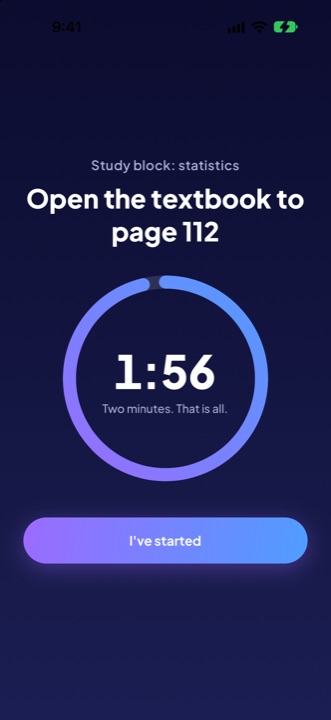
A normal alarm tells you that time has come. Kickoff goes one step further: the alarm opens straight onto the first tiny thing to do, with a two-minute countdown, and stays with you until the block is done.


How it works
- A warning before the block. Ten and two minutes before a block you get a plain notification, like "Wrap up. Essay starts at 14:00", so the switch is not a surprise.
- The start alarm. At the minute the block begins, the alarm rings with three choices: Start, 5 more min, or Skip today. On Android it appears full-screen over the lock screen when that permission is on, and as a loud notification when it is not.
- One tiny first step. Tap Start and you land on a single step in large type, for example "Open the doc and write one bad sentence", with a two-minute countdown ring.
- A check-in at minute five. Five minutes in, a notification asks "Still going?" with Yes or Stuck. Stuck lets you make the step smaller.
- A guilt-free close-out. When the block ends, choose Done, Partly or Move it. Moving a block simply reschedules it. Nothing is counted against you.
Good to know
- Free plans include 3 start alarms per day. Pro removes the limit.
- Alarm delivery depends on your phone settings and cannot be guaranteed. The in-app Alarm health screen and Test my alarm now button show whether your phone is set up well.
- On iPhone, iOS 26 and later uses the system alarm. Earlier versions use Time Sensitive notifications, which are not as strong. Alarms are re-scheduled automatically after a restart, an app update, or a time-zone change.
Plan: Included in Free (3 start alarms per day). Unlimited in Pro.