 Kickoff
Home / Features / Visual day timeline
Visual day timeline
Your day as something you can see
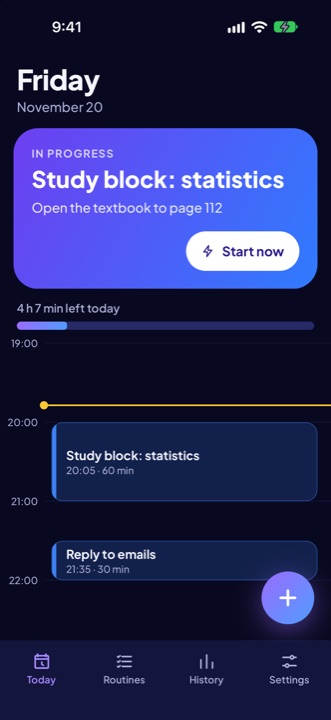
The Today tab lays your day out as blocks on a vertical timeline, with a Next up card at the top and a bar showing how much of the day is left.


How it works
- Add a block. Give it a name, a start time, a length, your own estimate and a tiny first step. Turn the start alarm on or off for each block.
- Drag to reschedule. Press and hold a block, then drag. It snaps to a five-minute grid and gives a small tap of haptic feedback. If you prefer not to drag, tap the block and change the start time instead.
- Next up. The card at the top shows the next block, its first step, how long until it starts, and a Start now button.
Good to know
- Designed to be calm: generous spacing, large type, restrained colour, no red overdue states.
- Light and dark themes follow your phone, with a manual override in Settings.
- Works offline. Your plan lives on your phone.
Plan: Included in Free and Pro.